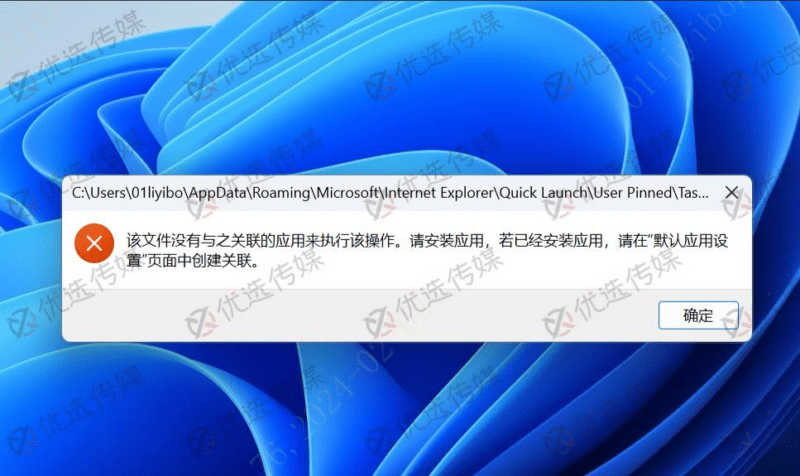


1. 问题现象
win11我们固定在任务栏的图标点击之后就出现这样的提示【该文件没有与之关联的应用来执行该操作……】弹窗,甚至连系统自带的文件管理器都打不开了。这是因为我们按照win10的方式去除快捷方式小箭头的方式对win11并不适用。按照win10去除小箭头之后,就会造成这个问题
![图片[1]-win10 win11固定在任务栏的应用该文件没有与之关联的应用来执行该操作-优选小栈](https://www.csweb.cn/wp-content/uploads/2026/03/image-24.png)
2. 恢复win11快捷方式小箭头
新建 【恢复小箭头.bat】文件
右键刚才新建的脚本文件,用记事本打开,内容复制粘贴如下
taskkill /f /im explorer.exe
reg add "HKEY_LOCAL_MACHINE\SOFTWARE\Microsoft\Windows\CurrentVersion\Explorer\Shell Icons" /v 29 /d "C:\Windows\system32\imageres.dll,154" /t reg_sz /f
reg add "HKEY_CURRENT_USER\Software\Microsoft\Windows\CurrentVersion\Explorer\Shell Icons" /v 29 /d "C:\Windows\system32\imageres.dll,154" /t reg_sz /f
reg add "HKEY_CLASSES_ROOT\lnkfile" /v IsShortcut /t reg_sz /f
reg add "HEKY_CLASSES_ROOT\piffile" /v IsShortcut /t reg_sz /f
start explorer
以管理员身份运行【恢复小箭头.bat】
3. 去除win11快捷方式小箭头
新建 【去除小箭头.bat】文件
右键刚才新建的脚本文件,用记事本打开,内容复制粘贴如下
reg add "HKEY_LOCAL_MACHINE\SOFTWARE\Microsoft\Windows\CurrentVersion\Explorer\Shell Icons" /v 29 /d "%systemroot%\system32\imageres.dll,197" /t reg_sz /f
taskkill /f /im explorer.exe
attrib -s -r -h "%userprofile%\AppData\Local\iconcache.db"
del "%userprofile%\AppData\Local\iconcache.db" /f /q
start explorer
pause
© 版权声明
文章版权归作者所有,未经允许请勿转载。
THE END

![数据库批量替换插件正式发布、一键换域名工具[插件发布]-优选小栈](https://www.csweb.cn/wp-content/uploads/2026/03/image-32.webp)




暂无评论内容